
1.
1.
1 2 3 4 | for i in range(5): for j in range(i+1): print('*', end='') print() |

1 2 3 4 | for i in range(5): for j in range(5-i): print('*', end='') print() |

1 2 3 4 5 6 7 8 | for i in range(5): for j in range(i+1): print('*', end='') print() for i in range(5): for j in range(5-i-1): print('*', end='') print() |
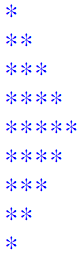
1 2 3 4 5 6 | for i in range(5): for j in range(5-i-1): print(' ', end='') for j in range(i+1): print('*', end='') print() |

1 2 3 4 5 6 | for i in range(5): for j in range(i): print(' ', end='') for j in range(5-i): print('*', end='') print() |

1 2 3 4 5 6 7 8 9 10 11 12 | for i in range(5): for j in range(5-i-1): print(' ', end='') for j in range(i+1): print('*', end='') print() for i in range(5): for j in range(i+1): print(' ', end='') for j in range(5-i-1): print('*', end='') print() |

1 2 3 4 5 6 | for i in range(5): for j in range(5-i-1): print(' ', end='') for j in range(i*2+1): print('*', end='') print() |

1 2 3 4 5 6 | for i in range(5): for j in range(5-i-1): print(' ', end='') for j in range(i*2+1): print(str(i+1), end='') print() |

1 2 3 4 5 6 | for i in range(5): for j in range(5-i-1): print(' ', end='') for j in range(i*2+1): print(str(j+1), end='') print() |

電子元件有micro:bit主板、iot:bit底板、以及SSD OLED1306
OLED驅動程式:fizban99/microbit_ssd1306
程式編輯工具:micro:bit Python Editor
程式檔案管理:除了main.py外,其餘檔案來自OLED驅動程式
1.利用小畫家以128*64來設計畫面

2.改寫OLED驅動程式microbit_ssd1306/sample_images/bitmapconverter.py的程式實現轉換:
1 2 3 4 5 6 7 8 9 10 11 12 13 14 15 16 17 18 19 20 21 22 23 24 | import struct from PIL import Image filename = 'treeart' pic = [0x00 for _ in range(128*64)] bmp_image = Image.open( filename+'.bmp' ) index=0 for i_horizon in range(bmp_image.width): for i_vertical in range(bmp_image.height//8): b=0x0 for i in range(0, 8): b>>=1 if bmp_image.getpixel((i_horizon, i_vertical*8+i)) == 255: b |= 0x80 pic[i_horizon+i_vertical*bmp_image.width]=b index+=1 newFileByteArray = bytearray(pic) with open(filename, 'wb') as newFile: newFile.write(newFileByteArray) print("Done") |

1 2 3 4 5 6 7 8 9 10 11 12 13 14 15 16 17 18 19 20 21 | from ssd1306 import initialize, clear_oled from ssd1306_bitmap import show_bitmap from microbit import * initialize() clear_oled() while True: show_bitmap('microbit_logo') display.scroll('Welcome to ') show_bitmap('craft_center') display.scroll('National Taiwan Craft Research and Development') show_bitmap('nfu') display.scroll('National Formosa University') show_bitmap('treeart') display.scroll('Workshop of Tree Art') show_bitmap('steam') display.scroll('OUTSTEAM International') show_bitmap('smartcreating') display.scroll('SmartCreating Co., Ltd.') show_bitmap('goods') display.scroll('Taiwan Rural Goods Promotion Alliance') |

電子元件有micro:bit主板、iot:bit底板、以及SSD OLED1306
OLED驅動程式:fizban99/microbit_ssd1306
程式編輯工具:micro:bit Python Editor
程式檔案管理:除了main.py外,其餘檔案來自OLED驅動程式

Python程式碼:
1 2 3 4 5 6 7 8 9 10 11 12 13 14 15 16 | from ssd1306 import initialize, clear_oled from ssd1306_text import add_text from ssd1306_bitmap import show_bitmap from microbit import * initialize() clear_oled() show_bitmap('microbit_logo') sleep(2000) clear_oled() add_text(0, 0, 'TreeArt:bit') i=0 while True: add_text(0, 2, str(i)) sleep(1000) i=i+1 |


程式:
1 2 3 4 5 6 7 8 9 10 11 12 13 14 15 16 17 18 19 20 21 22 23 24 25 26 27 28 29 30 | class Count: def __init__(self, str): self.words = 0 self.halfwords = 0 self.fullwords = 0 self.charactersWithSpace = len(str) self.charactersWithoutSpace = len(str) contineflag = 0 for c in str: if c == ' ': self.charactersWithoutSpace-=1 contineflag = 0 if '\u4e00' <= c <= '\u9fef': self.words+=1 self.fullwords+=1 contineflag = 0 else: if contineflag == 0: self.halfwords+=1 self.words+=1 contineflag = 1 str = input("請輸入文字含中英文:") cnt = Count(str) print("字元數含空白", cnt.charactersWithSpace) print("字元數不含空白", cnt.charactersWithoutSpace) print("字數", cnt.words) print("半型字數", cnt.halfwords) print("全型字數", cnt.fullwords) |
1.寫中文資料到檔案
1 2 3 4 | fp=open("test.txt", "w", encoding = "UTF-8") fp.write("好吃芋頭在雲林縣林內鄉烏塗村\n") fp.write("好吃花生在雲林縣元長鄉和虎尾鎮") fp.close() |
1 2 3 4 5 | fp=open("test.txt", "r", encoding = "UTF-8") lines=fp.readlines() for line in lines: print(line) fp.close() |
1 2 3 4 5 | fp=open("test.txt", "r", encoding = "UTF-8") lines=fp.readlines() for line in lines: print(line, end="") fp.close() |
1 2 3 4 5 | with open("test.txt", "r", encoding = "UTF-8") as fp: lines=fp.readlines() for line in lines: print(line, end="") fp.close() |
1 2 3 4 5 6 7 8 | with open("test.txt", "r", encoding = "UTF-8") as fp: lines = fp.read().split("\n") line_cnt = len(lines) word_cnt = char_cnt = 0 for line in lines: words = line.split() word_cnt, char_cnt = word_cnt + len(words), char_cnt + len(line) print("File {0} has {1} lines, {2} words, {3} characters".format("test.txt", line_cnt, word_cnt, char_cnt)) |
1.找因數
1 2 3 4 5 6 | a=int(input('請輸入大於零的整數:'))
if(a>0):
for i in range(1,a+1):
if(a%i==0):
print(i,end=" ")
print("")
|
1 2 3 | a=int(input('請輸入大於零的整數:'))
a_set={n for n in range(1,a+1) if a>0 and a%n==0}
print(a_set)
|
1 2 3 4 5 | a=int(input('請輸入大於零的整數A:'))
a_set={n for n in range(1,a+1) if a>0 and a%n==0}
b=int(input('請輸入大於的整數B:'))
b_set={n for n in range(1,b+1) if b>0 and b%n==0}
print(a_set & b_set)
|
1 2 3 4 5 | a=int(input('請輸入大於零的整數A:')) a_set={n for n in range(1,a+1) if a>0 and a%n==0} b=int(input('請輸入大於的整數B:')) b_set={n for n in range(1,b+1) if b>0 and b%n==0} print(max(a_set & b_set)) |
1 2 3 4 5 | a=int(input('請輸入大於零的整數A:')) a_set={n for n in range(1,a+1) if a>0 and a%n==0} b=int(input('請輸入大於的整數B:')) b_set={n for n in range(1,b+1) if b>0 and b%n==0} print(a*b//max(a_set & b_set)) |
1 2 3 4 5 | a,b=int(input('請輸入大於的整數(A, B):')) print(a,b) a_set={n for n in range(1,a+1) if a>0 and a%n==0} b_set={n for n in range(1,b+1) if b>0 and b%n==0} print(a*b//max(a_set & b_set)) |
1 2 3 4 5 | a,b=eval(input('請輸入大於零的整數(A, B):')) print(a,b) a_set={n for n in range(1,a+1) if a>0 and a%n==0} b_set={n for n in range(1,b+1) if b>0 and b%n==0} print(a*b//max(a_set & b_set)) |
1 2 3 4 5 6 7 8 9 10 11 12 13 | def gcd(a, b): if b==0: return a else: return gcd(b, a%b) def lcm(a, b): return a*b//gcd(a, b) a,b=eval(input('請輸入大於零的整數(A, B):')) print("gcd(",a,",",b,")=", gcd(a,b)) print("lcm(",a,",",b,")=", lcm(a,b)) |
1 2 3 4 | import math a,b=eval(input('請輸入大於零的整數(A, B):')) print("gcd(",a,",",b,")=", math.gcd(a,b)) print("lcm(",a,",",b,")=", math.lcm(a,b)) |
1 2 3 4 | from sympy import * a,b=eval(input('請輸入大於的整數(A, B):')) print("gcd(",a,",",b,")=", gcd(a,b)) print("lcm(",a,",",b,")=", lcm(a,b)) |

1 2 3 4 | import sympy a,b=eval(input('請輸入大於零的整數(A, B):')) print("gcd(",a,",",b,")=", gcd(a,b)) print("lcm(",a,",",b,")=", lcm(a,b)) |
1 2 3 4 | import sympy a,b=eval(input('請輸入大於零的整數(A, B):')) print("gcd(",a,",",b,")=", sympy.gcd(a,b)) print("lcm(",a,",",b,")=", sympy.lcm(a,b)) |
